DataFrames in Spark: A Comprehensive Guide
What is a Spark Dataframe?
Dataframes in Spark are structured and labelled data in two dimensions like a spreadsheet or table. Spark dataframes are built over Resilient Distributed Dataset (RDD) and therefore stored in several partitions.
Spark Documentation describes Dataframe as
“A DataFrame is a DataSet organized into named columns. It is conceptually equivalent to a table in a relational database or a dataframe in R/Python, but with richer optimizations under the hood.”
Features of DataFrame
Over traditional dataframes, Spark DataFrame offers the following features.
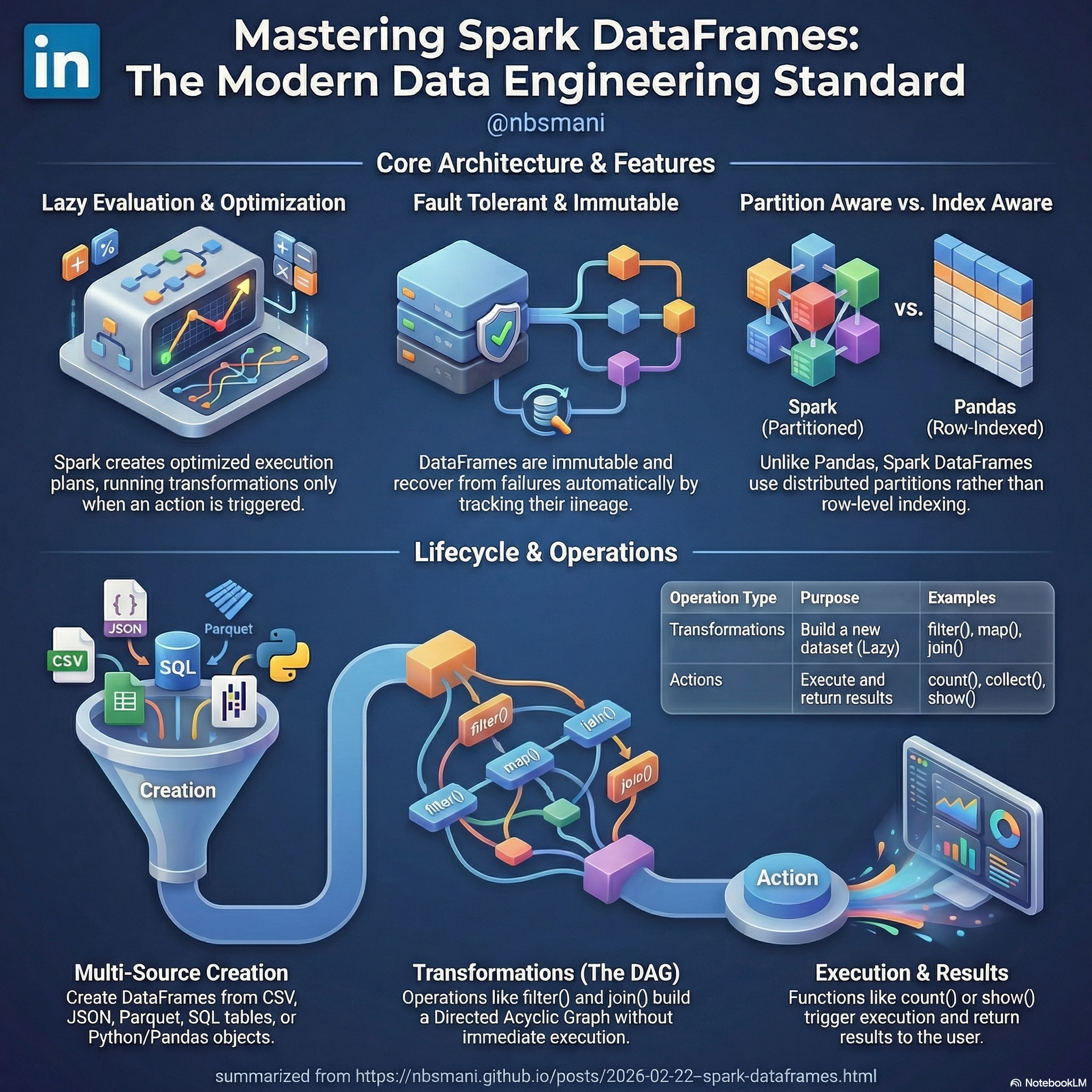
- Immutable: Spark dataframes are immutable and any transformation made on the dataframe result in creation of new dataframe.
- Lazy Evaluation: Spark dataframes are lazily evaluated. When a transformation is applied over a dataframe, an optimized execution plan is created and the execution is carried out only when an action is called.
- Optimized: Spark dataframe is a high level API of RDD and the executions are optimized (logical and physical). The detailed optimization can be read in this article .
- Fault Tolerant: Since the spark DataFrame are built over the RDD structure, they are inherently fault tolerant. When a node or partition fails, the replacement partition is recreated by tracking the lineage without restarting the process from scratch or stopping the process.
- Schema Aware: Spark dataframes hold defined datatypes and constraints for each column of the dataframe. It offers schema flexibility by supporting schema evolution and dynamic typing.
One notable difference between a pandas dataframe and a spark DataFrame is that pd.DataFrame is index aware where as the records in the spark DataFrame are not indexed but stored as partitions, this is known as partition aware property.
Creating a Dataframe
A dataframe can be created by the following 3 ways:
From an external file
Spark offers several file formats such as csv, json, parquet, ORC, avro, hdfs.. Dataframe can be created from any of these sources using spark.read.csv("file_path", args) or spark.read.format("format_name").load("file_path") which is consistent for all the file formats.
From another df like object
Spark dataframes can also be created using traditional data containers such as list of dictionaries / tuples or from pandas DataFrame object. This can be done using spark.createDataFrame(df_name)
from pyspark.sql import SparkSession
#create a SparkSession

spark = SparkSession.builder.appName("EmployeeDataFrame").getOrCreate()

employees = [
  {"name": "John D.", "age": 30, "department": "HR"},
  {"name": "Alice G.", "age": 25, "department": "Finance"},
  {"name": "Bob T.", "age": 35, "department": "IT"},
  {"name": "Eve A.", "age": 28, "department": "Marketing"}
]
df = spark.createDataFrame(employees)
#Select only the name and age columns
new_df = df.select("name", "age")

#Since DataFrame is lazily evaluated, we need to call an explicit action to see the results.

new_df.show()
+-------+---+
|   name|age|
+------- +---+
|John D. | 30|
|Alice G.| 25|
|  Bob T.| 35|
|  Eve A.| 28|
+-------+---+
From an existing table in the SparkSession
If there is a named table available in the SparkSession, it can be read as a DataFrame using read.table() method. For example, lets assume a sales table is available in the SparkSession
#create a SparkSession
from pyspark.sql import SparkSession

spark = SparkSession.builder.appName("Sales").getOrCreate()

df = spark.read.table("sales")
df.show()

#this will show the existing SQL table now stored as a Spark DataFrame
+---------+----------+------+--------+--------------+
| category|    price|product|quantity|  salesperson|
+---------+----------+------+--------+--------------+
|Electronics|   1200.5| Laptop|       5|   John Smith|
|Electronics|    25.99|  Mouse|      20|  Alice Brown|
| Furniture|    350.0|   Desk|       3|  Bob Johnson|
| Furniture|    175.5|  Chair|       8|    Eve Davis|
|Stationery|     4.99|Notebook|     100|   John Smith|
|Stationery|     1.99|     Pen|     200|  Alice Brown|
|Electronics|    450.0|Monitor|       4|  Bob Johnson|
| Furniture|    280.0|Bookshelf|      2|    Eve Davis|
+---------+----------+------+--------+--------------+
Alternate methods to read a table
The table can also be read using a shorter table() orsql() function to store the output of a SQL query as DataFrame()
##reading using `table()`
df = spark.table("sales")

## Storing the output of a SQL query as a Spark DataFrame
df = spark.sql("SELECT * FROM sales" )
Operations on Spark DataFrames
RDDs (thus Spark DataFrames) supports the following two types of operations
- Transformations
- Actions
Transformations
Transformations create a new dataset from existing one In principle, the transformations are lazily evaluated. Once a transformation is called, a Directed Acyclic Graph (DAG) is built but it is not executed until an action is called. The following are some examples of transformations map(), filter(), sample(),distinct() union() join(), repartition()
Actions
Action returns the evaluated result of the computation on the dataset to the driver program and to the user. The following are some examples of actions count(),first(),collect(), show()
Common Operations
Here is an example of common operations on Spark DataFrame
### Common DataFrame Operations

# Once you have a DataFrame `df`, you can perform various transformations and actions:

# Filtering
filtered_df = df.filter(df.age > 28)

# Adding columns
df_with_tax = df.withColumn("tax", df.price * 0.1)

# Aggregations
df.groupBy("department").avg("age").show()
Conclusion
Spark DataFrames are a powerful and flexible way to work with structured data in Apache Spark. They provide a high-level API for working with data, while also offering the performance and scalability benefits of Spark’s underlying RDD structure. By understanding how to create and manipulate DataFrames, one can unlock the full potential of Spark for the data processing needs.