Query Optimization in Apache Spark: A Deep Dive
Apache Spark has a query optimization engine that rewrites the user code for optimum computational cost and execution efficiency. The optimization process start is carried out in several steps from parsing the code to executing the optimized generated code.
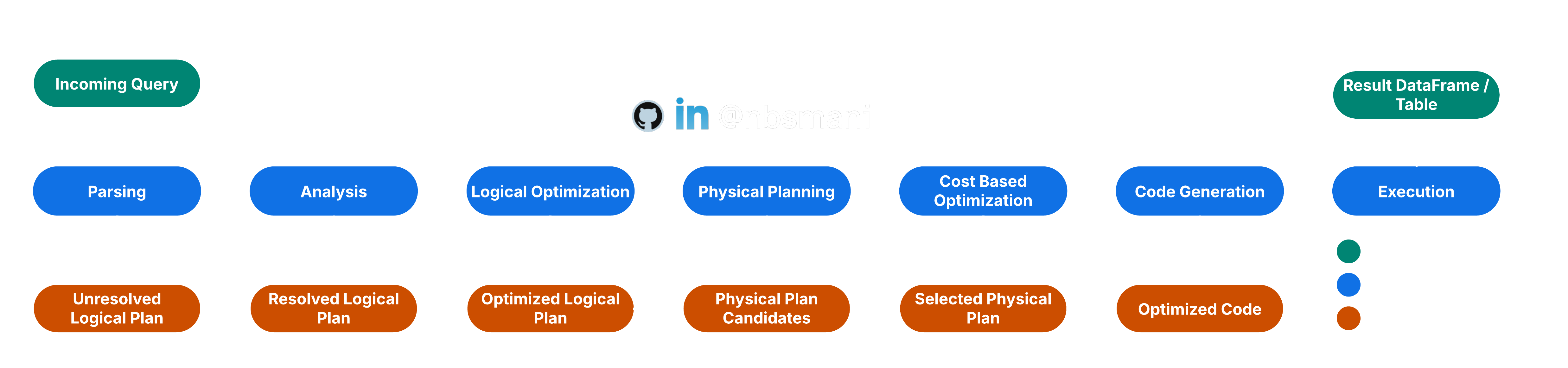
Parsing
Each SQL / Hive queries are first read in the Parsing process. This parsing process converts the input into Abstract Syntax Tree (AST). This AST is called Unresolved Logical Plan.
Analysis
The Unresolved Logical Plan is validated for Table/Column names and data types by looking up into the catalog. It also resolves the attributes and binds to the actual schema. It also verifies the functions that is actually available. After Analyzer Rules Execution, this steps yields an entity known as Resolved Logical Plan
Logical Optimization
The Resolved Logical Plan is then undergoes into a Rule-Based Optimization step. There are several rules that are applied here and some of the key optimization rules are
- Predicate Pushdown: This rule prepones the filter operation as early as possible in the query execution plan. The idea is to reduce the volume of data that flows in the operation as early as possible.
- Combine Filters: This rule combines similar filter operations into one.
- Projection Pruning: This rule selects only the required columns that are implicated in the query.
- Null Propagation: Optimize null checks
- Constant Propagation: if there is any computation involves using a constant, it is simplified at the beginning and not executed repeatedly through out the query execution.
The logical optimization steps yields Optimized Logical Plan
Physical Planning
The Optimized Logical Plan is then evaluated against a cost model for several alternative plans. The estimation of cost is projected based on
- Data size
- Complexity of the operation
- Network shuffle cost
- Resource requirements
The least expensive model is selected in this step and it is called Selected Physical Plan.
Code Generation and execution
The selected physical plan is then taken as a base and an optimized code and the execution is then carried out as described in Essentials of Spark Architecture.
Visualizing the Spark Optimization Steps
The selected physical plans can be read using df.explain() | df.explain("simple") and all the steps of the optimization plan can be seen df.explain("extended"). The generated code can be seen using df.explain("codegen") and df.explain("cost") can print the logical plan and statistics if they are available.